How to close duplicate tabs in Chrome
To close duplicate tabs in Chrome with TidyTabs, open the extension, check the Duplicates count in Overview, and select Clean now. With the default Exact URL Match setting, one open copy of each matching page stays in your browser.
Clean up the duplicates you already have
- Install TidyTabs from the Chrome Web Store, then open it from Chrome's Extensions menu.
- Open Settings. Under Duplicate Tabs, use Exact URL Match to match complete page addresses.
- Choose a Conflict Resolution rule. Keep Active Tab (Recommended) prefers an active matching tab, falling back to the newest one. Keep Most Recently Created keeps the newest matching tab.
- Go to Overview. The Duplicates card shows how many tabs Clean now will remove. Select it when you're ready.
Cleanup works across your open windows. Pinned tabs, tabs inside a tab group, blank new tabs, and browser pages are excluded. Parked entries belong to a separate list and are not part of the duplicates count.
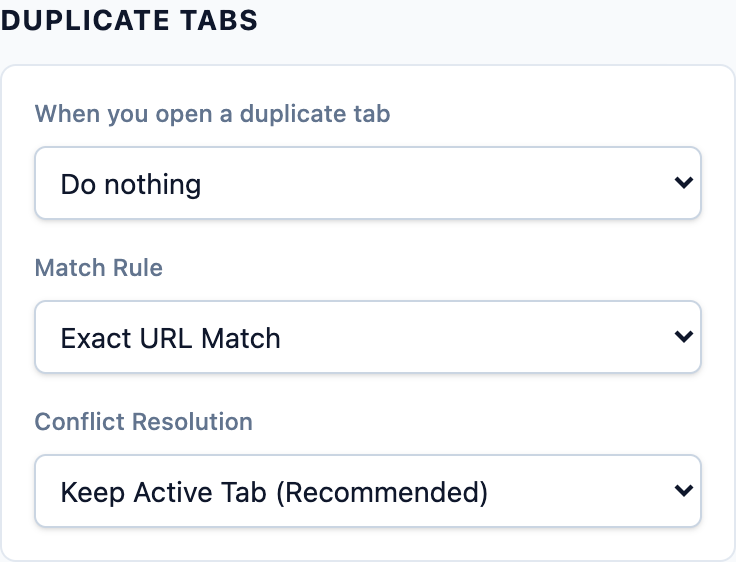
Choose how new duplicates are handled
In Settings, When you open a duplicate tab gives you three choices. Manual cleanup remains available in each mode.
| Mode | What happens |
|---|---|
| Ask me which tab to keep | A newly opened duplicate shows a choice to switch to an existing tab or keep both. This is the default. |
| Close the older tabs automatically | Background cleanup acts when there are more than two matching tabs and leaves two copies. Use Clean now to reduce matching tabs to one. |
| Do nothing | You decide when to run Clean now. Opening a duplicate does not trigger automatic cleanup or a prompt. |
The ask prompt applies to a new tab's first web navigation. Reloading a page or moving back and forward does not trigger it.
What counts as a matching page?
Exact URL Match compares the complete address. Ignore Query Parameters compares the origin and path, leaving out the query and fragment. Same Domain Only matches the hostname, so different articles on the same site can count as duplicates.
Keep Exact URL Match when you want to remove repeated copies of a specific page. Broader rules are useful only when those different addresses should be treated as the same thing.
Where do closed duplicates go?
Duplicate cleanup leaves a matching tab open instead of saving each removed copy in History. The other copy can have different unsaved form input or page state, even at the same address, so finish that work before cleaning up.
In version 1.1, Popular also tracks pages you repeatedly open as duplicates. Search that list by title or address to switch to an open copy or reopen a page.
TidyTabs includes duplicate handling, tab budgets, auto-close, kept pages, and Most popular tabs.
Add TidyTabs to Chrome